Vent.X tips – Throw pattern designer

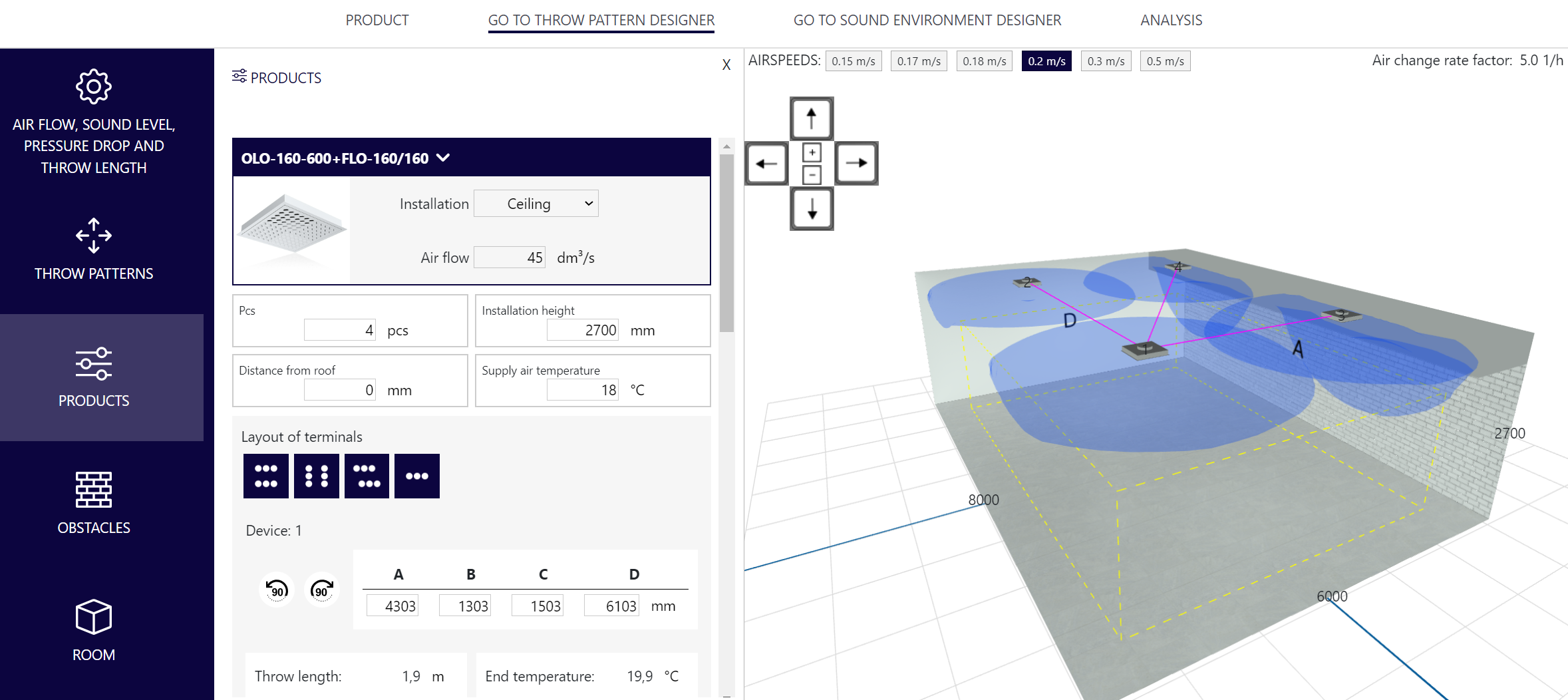
In this article, we explain in more detail what is included in the Throw pattern designer tab. You can access the design of the throw pattern designer from the tabs in the Products front page. From the menus that open on the left side of the view, you can change the information of the device, room and throw patterns. Everything you need is easily in one view.

Airflow, sound level, pressure drop and throw length: The device information can be edited and the airflow can be adjusted to a certain level or according to the structure of the space in this menu. If there is more than one air terminal device in the plan, the information of each device can be edited from the drop-down menu below.

Throw patterns: You can choose the most suitable throw pattern for the device or direct the throw pattern as required.

Devices: The location, size, number, installation height, or supply air temperature of the device(s) can be changed in this menu. If there are several devices in the plan, you can use their location buttons at the bottom of the menu. If the device can be installed both on the ceiling and on the wall, you can choose the installation location.

Obstacles: You can add obstacles to the space, and define their dimensions and locations. Obstacles can be used to model, for example, beam structures in the ceiling.

Room: Enter the dimensions of the room from the menu, if necessary, you can add a lower ceiling grid, which also works as a snap net for transferring terminal devices.

Air speeds: From the upper left corner of the simulation screen, you can activate at which air speeds the throw patterns are displayed.

Air change rate factor: In the upper right corner of the simulation screen, you can see the air change rate factor of the space.
Go to Vent.X

More Vent.X tips

adding obstacles

News

Climecon appoints Ville Wallendahr as new CTO and Dima Pukki as Product Manager for professional kitchen solutions

We are delighted to share news of an appointment that strengthens Climecon’s expertise and accelerates our product development toward smarter and more innovative solutions. Ville Wallendahr takes the lead as the company’s Chief Technology Officer, and Dima Pukki transitions from Sales Manager to Product Manager for Professional Kitchen Solutions. Both appointments support our growth and reinforce our position as a responsible forerunner in the industry.

Read more

Data‑driven energy savings and excellent indoor air quality in one solution

OptiDemand’s demand‑controlled DCKV solutions have been widely installed in professional kitchens across Finland, and the results have been excellent, also from the perspective of measured data. We have become the clear market leader in supplying DCKV systems in Finland. Demand‑controlled ventilation saves energy while ensuring the best possible air quality in the kitchen—without compromises.

Read more

Viivi Moisio – an incredible sailing adventure we are proud to support

Viivi Moisio is one of Finland’s most exciting sailors, and we’re absolutely thrilled to be part of her journey. Earlier this year, Viivi reached an amazing milestone: she built her own boat from scratch and completed it just in time for the Helsinki Boat Show, which wrapped up in mid‑February. The project has highlighted Viivi’s perseverance, skill, and courage — values we are proud to stand behind.

Read more